
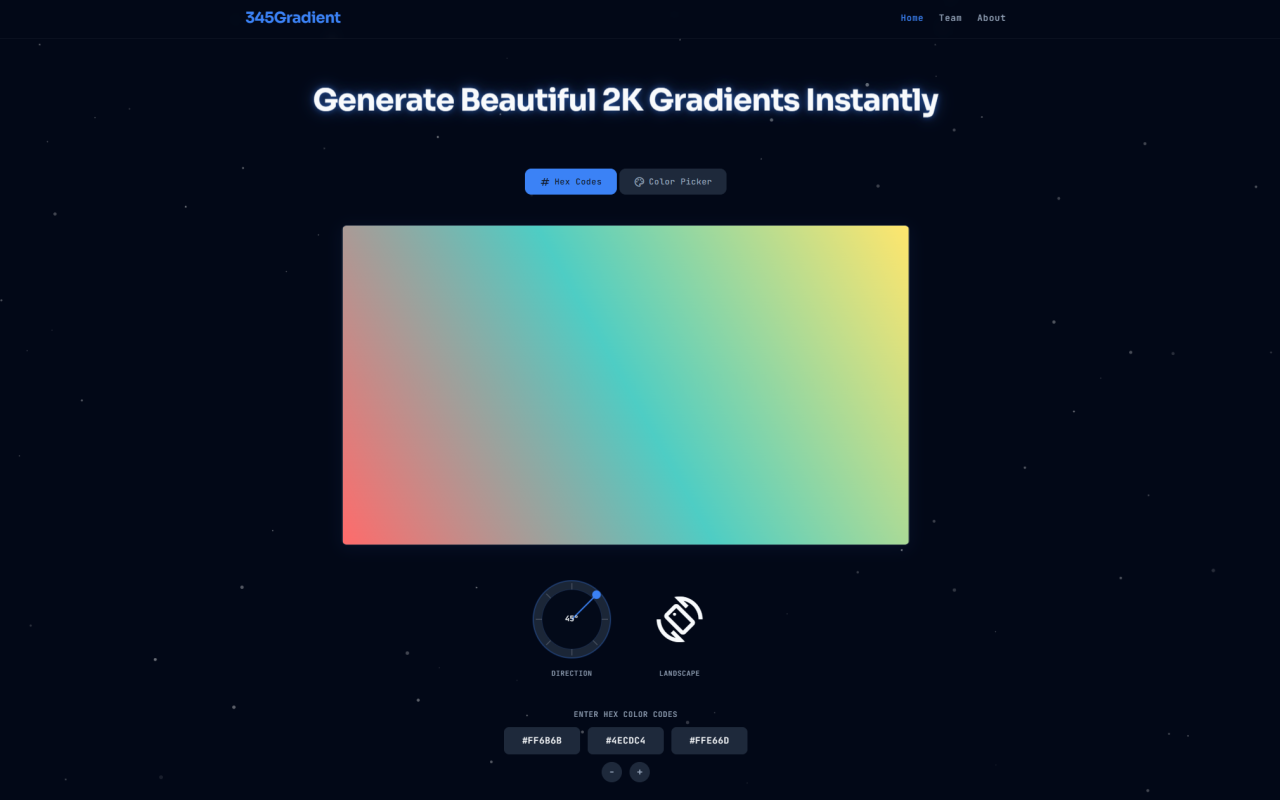
Gradient generators are a dime a dozen on the web, but most of them come with trade-offs: low-resolution exports, cluttered interfaces plastered with ads, or server-side processing that makes you wonder who is peeking at your color palettes. I recently spent time with 345Gradient, a free online tool from the 345tool collective, and it surprised me with how stripped-down and intentional it is. There is no account creation, no watermark, and no upload pipeline. You pick your colors, set an angle, and download a 2K PNG. Period. Here is what I found after putting it through its paces.
First Impressions and Interface Layout
Upon visiting gradientget.com, the first thing you notice is how clean the page is. There is no sidebar, no pop-up begging for your email, and no auto-playing video. The entire tool sits front and center in a single-column layout. Above the fold, you get the gradient preview area on the left and a compact control panel on the right. The heading reads Generate Beautiful 2K Gradients Instantly, and that is exactly what it lets you do. The color palette area accepts between two and four colors, with small minus and plus buttons to adjust the count. Below that, a circular direction knob handles the angle, and a toggle lets you switch between landscape (2560×1440) and portrait (1440×2560) orientations. A single download button finishes the workflow. I clocked the entire onboarding process at under thirty seconds from landing to first export. There is no fat here.
Precision Color Controls: Hex Input and Color Picker
345Gradient offers two distinct ways to define your gradient colors, and both work well. The default mode is hex code entry, which is ideal if you are working from a design system or a brand style guide. Each color slot shows a small text field where you can paste exact hex values like #FF6B6B or #2D3748. The preview updates in real time as you type, with zero perceptible lag. If you prefer a more visual approach, you can toggle to the color picker mode, which replaces the hex fields with standard browser color swatches. Clicking a swatch opens a native picker where you can drag through hue, saturation, and luminosity. I found this mode more useful for quick ideation when I was not tied to specific brand colors. The live preview made it easy to explore combinations like a muted slate-to-warm khaki transition or a deep purple fading into black.
360-Degree Angle Control with the Direction Knob
Most free gradient tools limit you to a handful of preset directions: top-to-bottom, left-to-right, diagonal. 345Gradient takes a different approach with a physical-inspired circular knob. You click and drag the indicator arrow around a 360-degree dial, and the gradient angle updates on the fly. The current angle is displayed numerically next to the knob, so you can dial in a specific value if you need precision. The tool defaults to 45 degrees (top-left to bottom-right), which is a safe, industry-standard starting point for diagonal gradients. I tested a few edge cases — 0 degrees for a horizontal split, 90 degrees for vertical, and 270 degrees for a bottom-to-top sunset look — and the rendering stayed crisp in every orientation. The ability to set any arbitrary angle rather than being locked into presets is a small but meaningful advantage over many competing tools.
Export Quality: True 2K Resolution with Client-Side Rendering
When you hit the download button, 345Gradient renders a PNG directly in your browser at 2560×1440 pixels in landscape mode or 1440×2560 in portrait mode. I downloaded several test gradients and inspected them in Photoshop at 100% zoom. The pixel grid was clean, with no visible banding or compression artifacts. The PNG files are uncompressed, so file sizes hover around 5-8 MB depending on color complexity — reasonable for a 2K raster asset. The real differentiator here is that everything happens client side. The tool is built on vanilla JavaScript, meaning no color data is sent to any server. This is a genuine privacy benefit for designers working on unreleased products or sensitive brand work. There is no tracking, no analytics pings, and no cookies being set. The FAQ page confirms this explicitly, stating that 345Gradient operates with zero server latency and complete data privacy. For freelancers and agencies who sign NDAs regularly, this matters.
Who Should Use This Tool
345Gradient is not trying to be the next Figma plugin or a full-blown design suite. It is a single-purpose utility, and it is excellent at that one thing. UI/UX designers will appreciate the hex input mode for matching design tokens and the 2K resolution for hero sections and app splash screens. Social media content creators can knock out Instagram story backgrounds or YouTube thumbnail gradients in under a minute. The portrait orientation mode is particularly handy for mobile-first assets. That said, the tool has limits worth noting. There is no CSS code export, which means you cannot copy a background: linear-gradient() snippet directly — you are getting a raster PNG only. If you need vector-based gradients for web code, you will still need a different tool. There is also no gradient preset library or save feature, so your work disappears when you leave the page. This is by design — the tool is intentionally ephemeral — but it is worth knowing going in.
Pricing and the 345tool Ecosystem
Pricing details are not publicly listed on the website because there is no pricing. 345Gradient is completely free to use with no hidden tiers, watermarks, or export limits. I tested this by downloading over a dozen gradients in a single session, and there was no cooldown, no rate-limiting popup, and no push to upgrade. The FAQ confirms that all generated assets are yours to use in personal, open-source, and commercial projects with zero attribution required. The tool is maintained by the 345tool team, an independent developer collective that builds privacy-first client-side utilities. You can visit 345tool.com to browse their other offerings, but like this gradient generator, they appear to be free and ad-free as well. If you care about avoiding bloated, tracker-laden alternatives, this is a refreshing change of pace.
Visit 345Gradient at gradientget.com to explore it yourself.


评论