
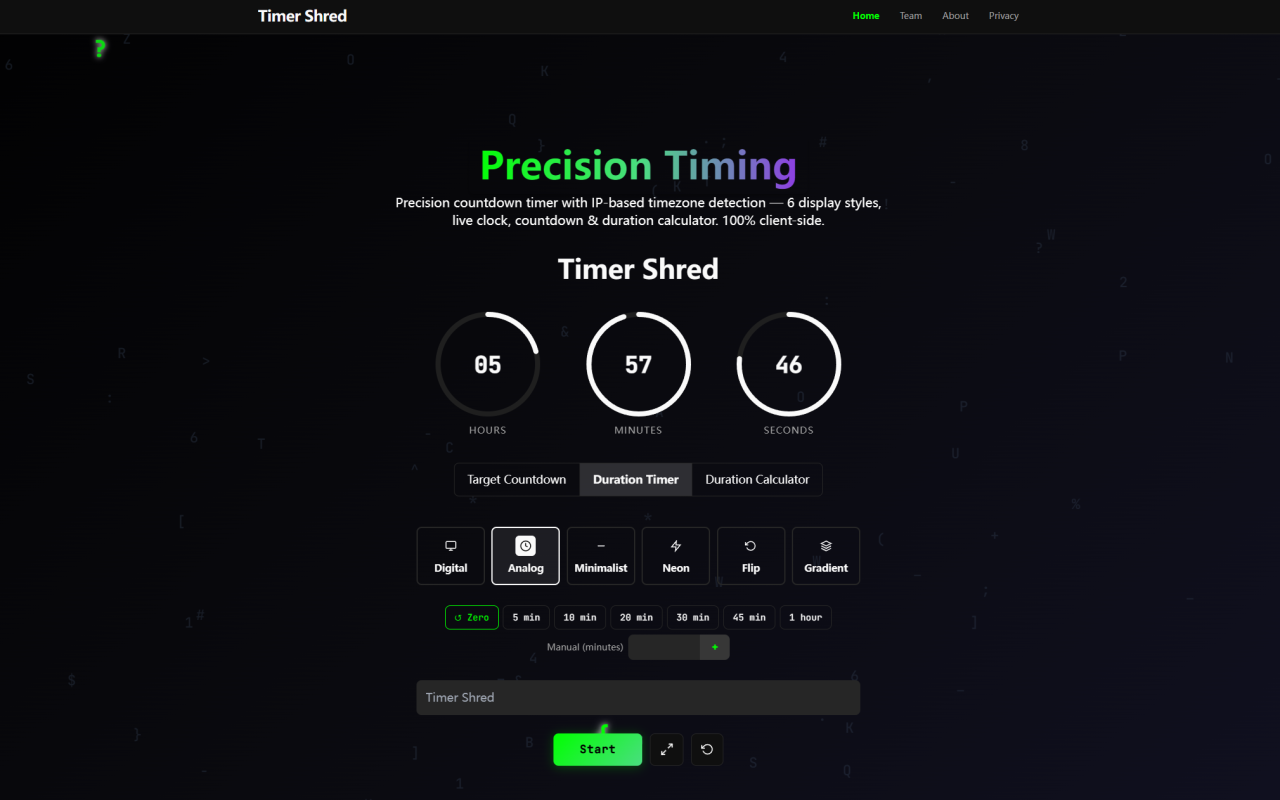
I clicked on Timer Shred expecting yet another barebones browser timer with awkward fonts and janky seconds. What I found instead is a surprisingly polished, privacy-first timing utility that feels like it was built by people who actually care about craft. No registration, no data collection, and six genuinely distinct visual themes. Here is what I found after spending real time with it.
First Impressions: Landing on Timer Shred
Upon visiting timershred.com, the first thing you notice is how clean everything is. There is no flashy hero section trying to sell you a subscription. The interface loads immediately with a centered clock face, a compact toolbar, and a row of template thumbnails along the top. The default view is a sharp digital clock display, but you can toggle through Analog, Minimalist, Neon, Flip, and Gradient skins without reloading the page. The fullscreen button is right there, and it works instantly across Chrome, Firefox, and Safari. There is no onboarding tour, no email popup, no cookie consent wall — just the timer, ready to go. A small banner ad sits above the title area, but it is unobtrusive and stays out of the way. This is a tool that respects your attention from the very first second.
Six Clock Templates That Elevate Any Workspace
The six visual templates are the standout feature here. Each one feels genuinely distinct rather than a lazy CSS swap. The Digital template is your clean workhorse — bold monospace numerals with high contrast. The Analog face renders a proper clock with hands, which is surprisingly rare in web-based timer tools. Minimalist strips everything back to thin, elegant text on a dark background — ideal for streamers who want a clean overlay. Neon gives you glowing cyberpunk-style digits that pop on dark studio setups. Flip renders a retro mechanical flip-clock aesthetic that fans of old-school airport departure boards will love. Gradient applies smooth color transitions behind crisp numerals. Every template respects high-contrast accessibility standards, and switching between them is instant because there are no server round trips. For creators running a second-screen setup for recording or live streaming, these templates look professional at full resolution without any watermarks or branding.
Three Timing Modes and a Surprisingly Capable Date Calculator
Timer Shred offers three core timing modes: a countdown timer, a count-up stopwatch, and a duration calculator. The countdown mode lets you set a target date and time down to the exact millisecond, or you can use the quick-preset buttons for 5, 10, 20, 30, or 45 minutes and 1 hour. The stopwatch runs continuously and displays milliseconds in real time. But the feature that surprised me most is the integrated Date Calculator. You can input two dates and instantly calculate the exact duration between them — including business days. This is genuinely useful for project managers tracking sprint timelines or content creators counting down to a launch. All calculations happen client-side, so there is zero latency and zero data leaving your machine.
Privacy Architecture: What Air-Gapped Really Means
Timer Shred is built on a zero-server network footprint. Every timing calculation, every text input, every calendar query executes entirely inside your browser's local memory. No data is sent to any remote server at any point. When I opened my browser's developer tools and watched the network tab while using the countdown, stopwatch, and date calculator, I saw zero outbound requests carrying user data. The only network calls were for loading the Google Fonts assets and the initial page HTML. This is rare in the online tools space, where most competitors log event titles, target dates, and usage patterns. Timer Shred even avoids traditional JavaScript's setInterval method in favor of requestAnimationFrame, which syncs the timer's rendering directly to your monitor's refresh rate. This means smoother digit transitions and lower CPU usage compared to typical browser timers that stutter under load.
Sharing, Exporting, and Real-World Workflow
Sharing a countdown is handled through a clever stateless URL hash system. When you set a target date and optionally add an event title, the parameters encode directly into the URL — for example, #2026-12-25_ProjectLaunch. Anyone who opens that link sees the countdown running immediately, with no server handshake or database lookup required. This is elegant engineering that removes friction entirely. For creators who need screenshots or overlays, the PNG export feature captures the current timer display as a full-resolution image that downloads directly to your device. No ZIP compression, no watermark, no upload required. I tested the export across multiple templates and the output was crisp and clean every time. The combination of stateless sharing and local export makes Timer Shred genuinely useful for remote teams, live streamers, and video editors who need timestamp graphics without touching a design tool.
Who Should Use Timer Shred and What's Missing
Timer Shred is free. There are no paid tiers, no subscription plans, and no feature gating. The site monetizes through a single banner ad and plans to transition toward contextual B2B link partnerships, but the core utility is fully open and unrestricted. This makes it ideal for streamers, podcasters, video editors, teachers, public speakers, and project managers who need a reliable, beautiful timer on a second screen. That said, there are some limitations worth noting. There is no alarm sound when a countdown reaches zero — the timer simply reaches zero and stops. There is also no recurring or interval timer mode for repeated countdown cycles, which coaches or HIIT workout users might want. And while the six templates look excellent, there is no custom CSS or color picker for users who want fine-grained control. These are genuine gaps, but for a free tool that prioritizes privacy and performance, the trade-offs are reasonable. Timer Shred is a rare example of a web utility that does one thing, does it beautifully, and respects you enough to not track your every click. Visit Timer Shred at https://timershred.com to explore it yourself.


评论